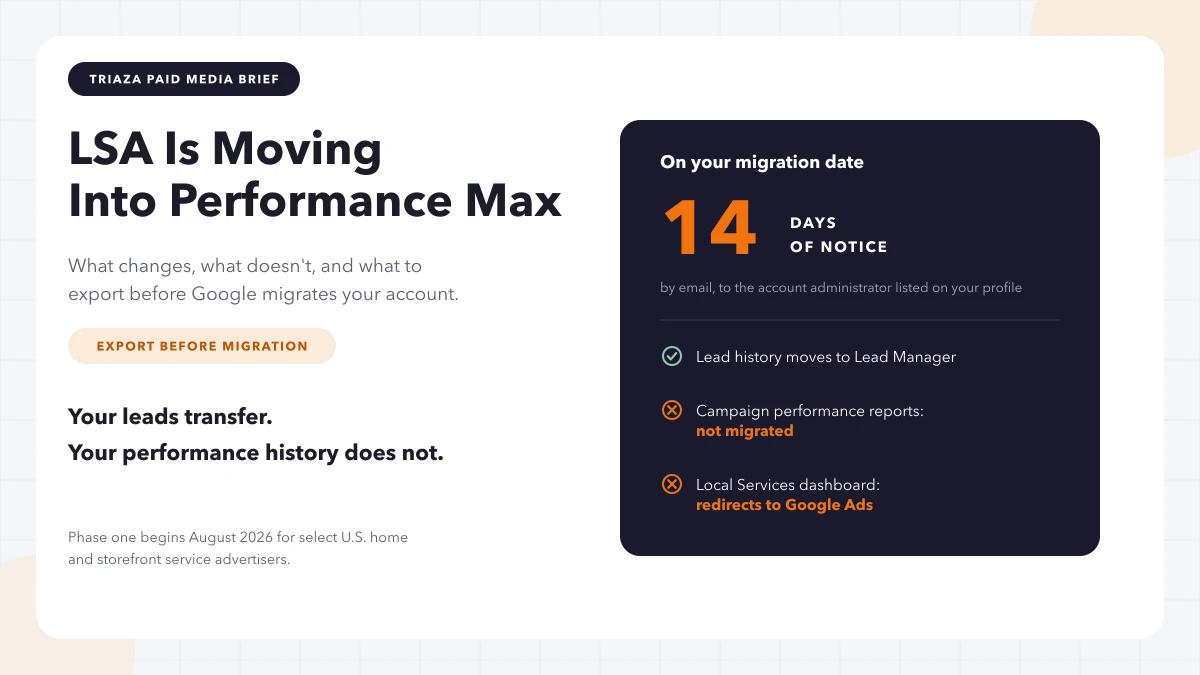
You get fourteen days’ notice. Then the Local Services dashboard redirects to Google Ads, and your performance reports don’t make the trip.
That’s the part of this announcement worth acting on. Google is moving Local Services Ads into Google Ads as a Performance Max campaign type built for pay-per-lead goals, and the first wave starts in August 2026 — which, at the end of July, means some accounts are already inside the notification window or about to be.
Most of the coverage has focused on the branding of it: LSA is becoming PMax, automation is eating another manual surface, and so on. The commercial model barely changes. What changes is that a specific, dated administrative task just landed on the calendar of every contractor running Local Services Ads in the United States, and nobody sends a second reminder after the dashboard is gone.
What do I need to do before Google migrates my Local Services Ads?
Export your historical LSA reports. Google says previous campaign-level performance metrics — past impressions, clicks, weekly spend, and ad-level performance reports — will not migrate to Google Ads, and you lose access to the old Local Services dashboard once the account moves. Lead history does transfer. Reporting history does not. Also confirm who’s listed as account administrator, because that’s who Google sends the 14-day warning email to.
What Google actually announced
Local Services Ads are becoming a specialized Performance Max campaign type. Same pay-per-lead billing, same Search and Maps placement, same keywordless targeting driven by your business categories and service areas. The management interface moves into Google Ads. If you haven’t run PMax before, the trade it asks you to make is the same one we covered in protecting PPC ROI as the SERP shrinks: more automation in exchange for less query-level visibility.
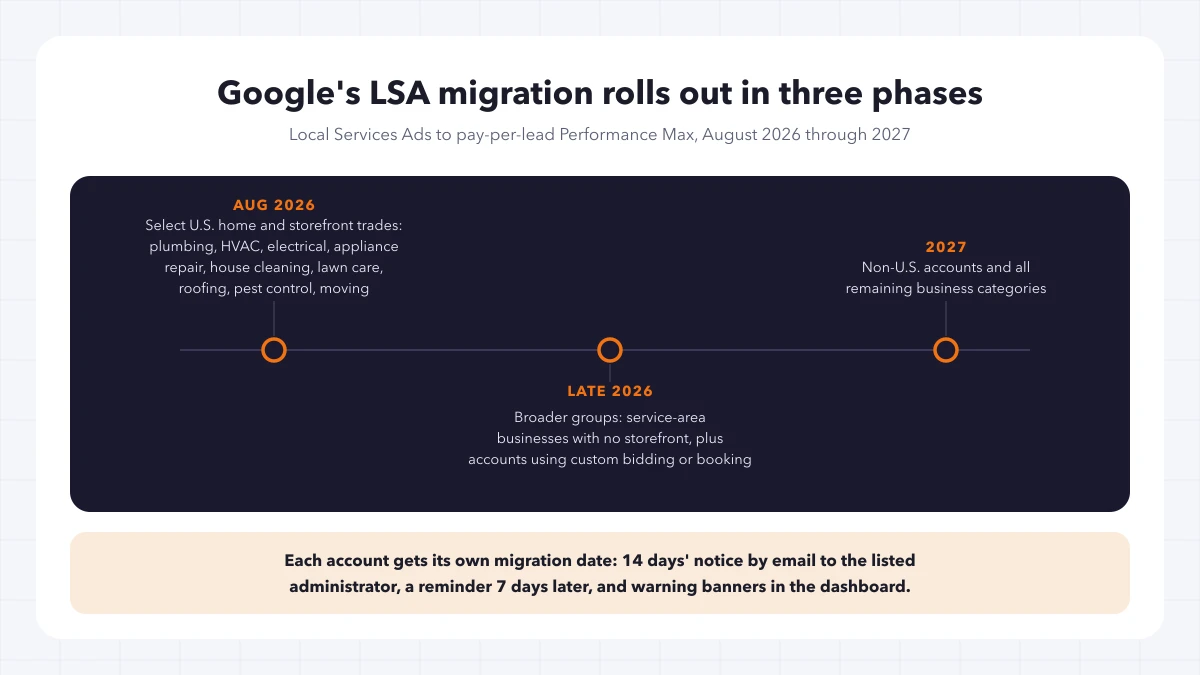
Google’s help documentation breaks the rollout into three phases:
- August 2026 — “select home and storefront service advertisers in the United States,” specifically naming plumbing, HVAC, electrical, appliance repair, house cleaning, lawn care, roofing, pest control, and moving.
- Late 2026 — broader groups, including service-area businesses without a physical storefront and accounts with custom bidding or booking configurations.
- 2027 — non-U.S. accounts and all remaining business categories.
If you run home services or pest control in the U.S., you’re in the first paragraph of that list, not the third.
One caution on those categories: trade coverage of this announcement has described the first wave in slightly different terms, and secondhand category lists have already drifted from Google’s. The help page is the authority on which verticals move when. Read it directly rather than trusting a summary — including this one.
This is not standard Performance Max
Worth clearing up early, because the name is doing a lot of misleading work.
Ordinary Performance Max runs across YouTube, Display, Search, Discover, Gmail, and Maps, and it wants an asset stack: headlines, descriptions, images, video, sitelinks. That’s the version most marketers picture when they hear PMax, and it’s the version people are bracing for.
The pay-per-lead local-services version keeps LSA’s constraints. Google says ads still appear only on Search and Maps, campaigns stay keywordless, billing stays per valid lead rather than per click, and the usual PMax components — headlines, videos, sitelinks — do not apply. You are not being asked to build a creative asset stack before August.
The framework is Performance Max. The behavior is still Local Services Ads with a different address.
What changes, and what it costs you
The commercial model holds. The operational layer is where the work is.
Budgets convert from weekly to daily. Google says your historical average weekly budget is divided by seven to set the new daily average. Arithmetically clean; worth verifying anyway, since it’s the number your spend runs against afterward.
Manual bidding goes away. Setting a maximum cost-per-lead is no longer supported once you’re in Google Ads.
Target CPA consolidates. Vertical-level Target CPA is deprecated in favor of a single campaign-level Target CPA applied across all your categories. If you’ve been paying a different target for drain cleaning than for water heater installs, that distinction disappears inside one campaign.
Google Business Profile becomes the source of truth for core details. Business name, address, and hours sync one direction, GBP into Google Ads. Google also says significant changes to name or address trigger a verification review that typically takes 24 to 48 hours, during which the campaign may pause. Which means a routine address cleanup, done at the wrong moment, can take your lead flow offline for two days.
BBB callouts are gone. Google says they’re no longer supported and recommends adding at least six other structured callouts — business hours, specialties, accepted payment methods — in their place.
None of those are catastrophic on their own. Together they’re a decent argument for touching your GBP record before your migration date rather than during it.
The real risk: your reporting history
The split below is what makes this urgent rather than merely annoying.
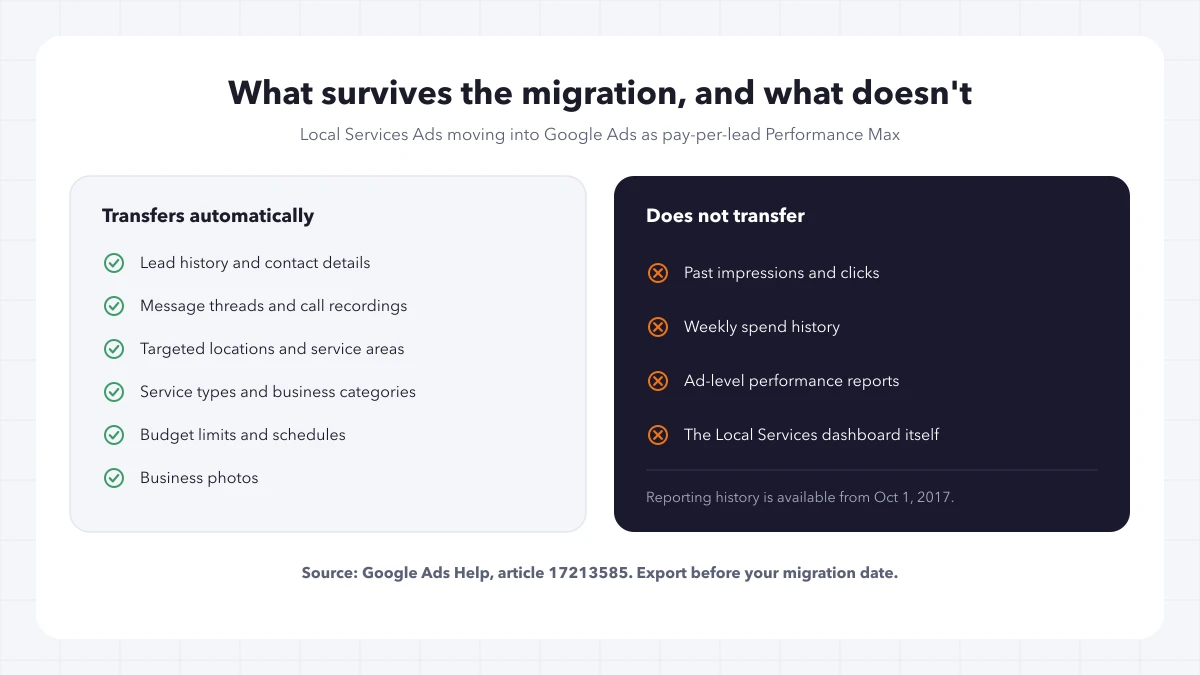
Google says lead history migrates. Contact details, message threads, and older call recordings land in Lead Manager inside Google Ads. That’s the part most advertisers worry about, and it’s fine.
Campaign-level performance history does not migrate. Google’s wording is direct: previous campaign-level performance metrics such as past impressions, clicks, weekly spend, and ad-level performance reports will not migrate to Google Ads. And the old dashboard — the only place that data lives — redirects to Google Ads on or after migration day.
So you keep the leads and lose the context. You’ll still know who called in March. You won’t easily know what March cost, how it compared to the previous March, or what your cost per lead looked like across a season.
For anyone who runs quarterly business reviews, that’s the whole benchmark set. Year-over-year comparisons, seasonality curves, the case for what LSA is worth next to paid search — all of it is built on data with a published expiration date now.
What’s actually in there is worth knowing before you go pull it. Google’s Local Services reports documentation describes reports covering the total charged in a period, lead spend filtered by category or direct business search, lead spend broken out by call, message, and booking, the full list of leads received, and lead credits issued — with data available from October 1, 2017 onward.
Nearly nine years of cost history, in other words, sitting behind a redirect with a two-week fuse.
The notification problem nobody’s flagging
Google sends the 14-day warning to the account administrator listed on the profile, with a reminder seven days later and banners in the dashboard.
Ask yourself who that is. On an account that’s been running for years, the administrator on file could be a former office manager, an agency you stopped working with, or an alias that forwards to nobody. Businesses that set LSA up once and never touched the account settings again are the most exposed, because the account has been working and nobody has had a reason to log in.
If the wrong person gets that email, the first signal you’ll have is a dashboard that no longer loads. By then the export window is closed.
Check the administrator on every account this week. It’s a five-minute task and it’s the single point of failure in the whole timeline.
Your pre-migration checklist
In rough order of how much it hurts to skip:
- Confirm the account administrator. Whoever is listed is who Google emails. Fix it now if it’s wrong.
- Export every LSA report you’d miss. Open the Local Services inbox, go to the menu, choose Reports, and pull the full history. Charged totals, lead spend by category, the call/message/booking split, lead credits. Take more than you think you need — you can’t go back for it.
- Save a benchmark snapshot outside Google. Monthly and trailing-twelve-month cost per lead, lead mix, spend, credit rate, and whatever close-rate assumptions you use. Put it somewhere that isn’t a Google product. This is what protects your next QBR.
- Audit the Google Business Profile now. Name, address, and hours are about to become the upstream source. Correct them before migration, not during, so the verification review doesn’t pause a live campaign.
- Decide whether multi-service accounts need splitting. One campaign-level Target CPA is coming whether you want it or not. More on the tradeoff below.
- Replace BBB callouts. Line up at least six structured callouts to fill the gap.
- Automate the export if you manage many accounts. Google’s Local Services API can return reporting data for managed accounts, which beats clicking through thirty dashboards on a deadline you don’t control.
Steps 1 and 2 are the ones with a hard deadline. The rest you can do after migration if you have to — you just won’t want to.
The Target CPA split isn’t obvious
The instinct, once you learn that per-vertical targets are going away, is to split every multi-service account into one campaign per service line. Google supports it: separate campaigns are the documented path if different verticals need different bidding logic.
It’s a real tradeoff, though, and Search Engine Journal’s coverage names the other side of it — lower-volume advertisers may find a combined campaign gives Google’s bidding stronger signals, because splitting divides your conversion data across campaigns that each have less of it to learn from.
Which way that lands depends on lead volume, and nobody has published a threshold. A roofer running hundreds of leads a month can afford to split. A two-truck electrical shop running a few dozen probably can’t without starving the algorithm. Treat it as a decision to make after you’ve seen a few weeks of post-migration data, not a change to rush in before August.
That reasoning is judgment, not a finding. There’s no study establishing where the line sits, and Google hasn’t offered one.
After the move
Expect a ramp. Google says settings such as targeted locations, service types, business categories, budget limits, schedules, and photos transfer automatically, but to allow up to two weeks for migration to complete and performance to return to stable levels.
Tell clients that in advance. A dip in week one is the expected shape of this, and an unprepared client reading a soft week as a failed migration is a conversation you can prevent with one email.
Lead handling moves to Lead Manager, under Goals → Conversions → Leads. Google says the familiar functions survive: charged status, lead type, feedback forms, downloading leads for CRM import, and reading and answering message leads inside Google Ads.
Two things to verify yourself rather than assume:
Check the transferred settings against what you had. Service areas, categories, schedules, and the converted daily budget. Automatic transfer is what Google intends, not a guarantee of what happened in your account.
Confirm your lead routing still works. If leads flow into a CRM, a call tracking system, or an intake team, the handoff moved. Test it with a real lead before you find out from a customer who never got called back.
One operational wrinkle for anyone opening new locations: Google says you can’t create new pay-per-lead campaigns directly inside Google Ads yet, and points advertisers to g.co/localservices for additional campaigns or accounts. The Google Ads API documentation says the same thing from the other direction — the API supports updates only for existing Local Services Performance Max campaigns, with creation not yet available, though you can identify one by the read-only local_services_enabled field on the campaign’s PMax settings. If your reporting pipeline or onboarding process assumes campaigns get built in Google Ads, it doesn’t yet.
Questions contractors keep asking
Will I lose my leads?
No. Google says customer lead history, contact details, message threads, and older call recordings transfer automatically into Lead Manager. It’s the performance reporting — impressions, clicks, weekly spend, ad-level reports — that doesn’t come with you.
How much warning do I get?
Fourteen days, by email to the account administrator listed on your profile, with a reminder seven days later and warning banners in the dashboard. There’s no published way to look up your own migration date ahead of that email, which is why confirming the administrator address is the first thing to do.
Is my category in the first wave?
Google’s help page names plumbing, HVAC, electrical, appliance repair, house cleaning, lawn care, roofing, pest control, and moving for the August 2026 phase, limited to select U.S. home and storefront service advertisers. “Select” is doing real work in that sentence — being in a named category doesn’t guarantee you’re in the first group. Check the source page rather than a summary.
Do I need to build Performance Max assets?
No. Google says the standard PMax components — headlines, videos, sitelinks — don’t apply to pay-per-lead local services campaigns. Ads stay on Search and Maps, and campaigns stay keywordless. The Performance Max name describes the framework, not the creative requirements.
Should I split my campaigns by service line?
Maybe, and not yet. Vertical-level Target CPA is being replaced by one campaign-level target, and separate campaigns are the documented workaround. But splitting divides your conversion data, which can weaken bidding for lower-volume advertisers. Get through migration, watch a few weeks of data, then decide.
What happens to my weekly budget?
Google converts it to an average daily budget by dividing your historical weekly average by seven. Verify the resulting number after migration — it’s what your spend runs against from then on.
Can I still create new LSA campaigns?
Not inside Google Ads. Google says new pay-per-lead campaigns can’t be created there yet and directs you to g.co/localservices for additional campaigns or local accounts.
Do the export this week
Everything else in this post can wait. The export can’t.
Google has published the timeline, named the categories, and stated plainly that campaign-level history doesn’t migrate. That’s about as much warning as an ad platform ever gives, and the whole cost of ignoring it is invisible until the first client asks how this spring compared to last spring and the answer is a dashboard that doesn’t exist anymore.
Pull the reports. Save the benchmark somewhere Google doesn’t control. Check who gets the email. Thirty minutes an account, and the rest of the migration is just campaign management.
If you’d rather hand that off — the exports, the benchmark snapshot, or a post-migration review of budgets, targets, service areas, and lead routing — that’s the kind of work our paid advertising team does. And if you’re rethinking the wider paid mix while the account is already open, our guide to PPC strategy for growing companies covers the ground next to LSA.