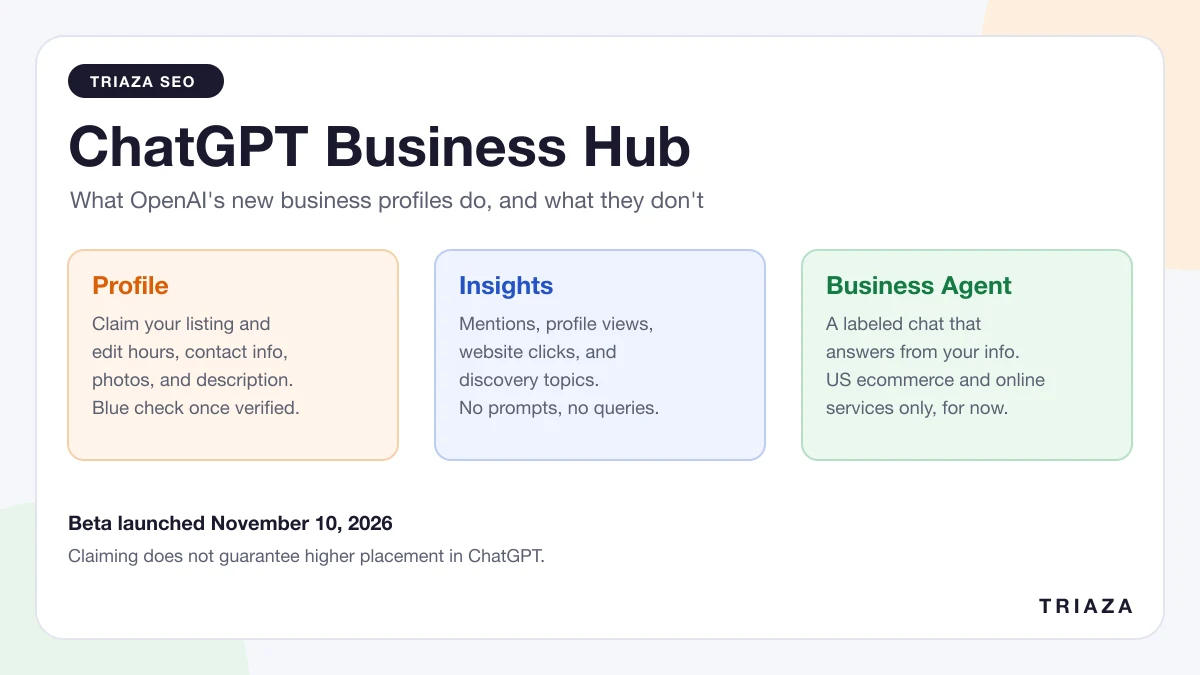
On November 10, 2026, OpenAI launched Businesses in ChatGPT in beta. The part most business owners will touch is Business Hub, a dashboard at chatgpt.com/business-hub where you claim your company’s profile, correct its details, and see how often ChatGPT mentions you and sends people to your site.
Until this week, ChatGPT gave businesses nothing of the kind. If it had your hours wrong, you had nowhere to fix them. If you wanted to know whether it ever brought you up, you paid a third-party tool for an estimate. Business Hub is OpenAI’s first answer to both problems, and it’s a partial one.
We claimed Triaza’s profile the day after launch. The screenshots here are from our account, and the rest comes from OpenAI’s announcement, its help article and policies, and the first days of reporting.
Business Hub gives you a profile you can edit, a small set of aggregate numbers (mentions, profile views, website clicks, and discovery topics), and, for eligible US ecommerce and online service businesses, a chat agent that answers questions about your products. OpenAI lists no fee for any of it. It does not show you the prompts people typed, and OpenAI says claiming a profile doesn’t guarantee more visibility or higher placement. Claim it anyway: fixing wrong information and getting a first-party baseline are both worth an hour.
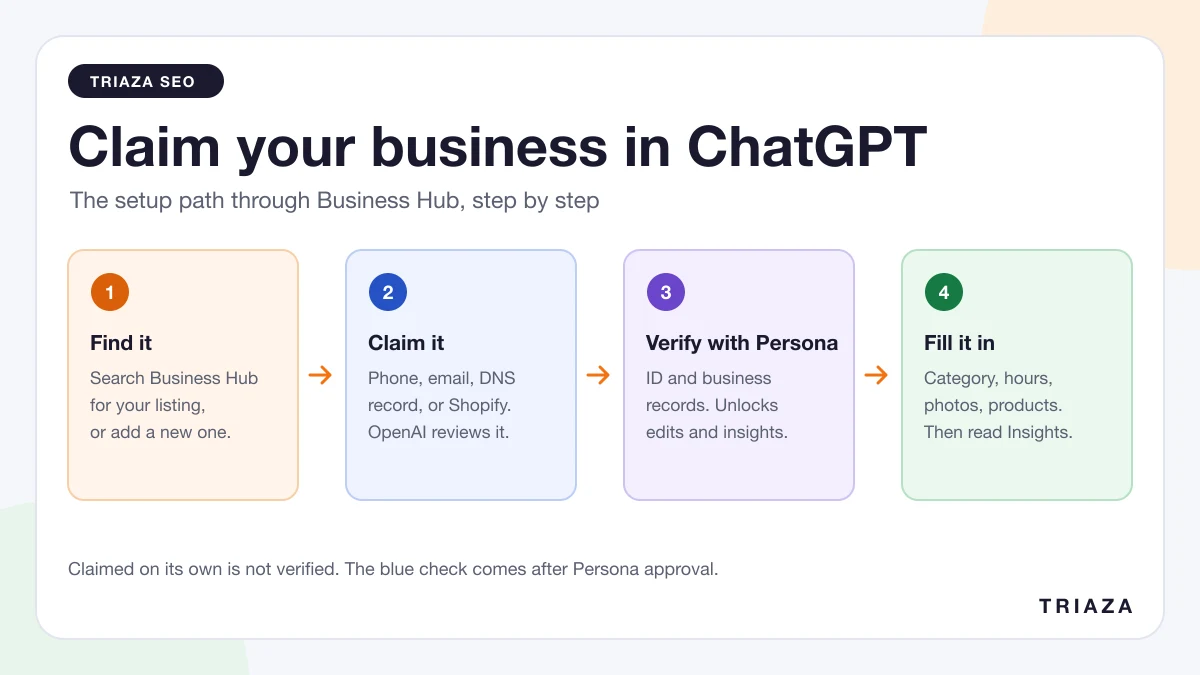
If you’ve already decided, the step-by-step setup guide walks through claiming and verification.
What OpenAI launched
Three names are in play, and they’re easy to mix up:
- Businesses in ChatGPT is the program as a whole.
- Business Hub is the dashboard where you manage a business.
- Business Agents are optional chat assistants that a business can publish.
OpenAI’s pitch is reach. The announcement puts ChatGPT’s audience at 1.2 billion people a week, and says the new tools strengthen how those people find businesses through “broader business coverage, up-to-date information, and the ability to connect with a business through its Business Agent.”
If you’ve used Google’s tools, the closest comparison is a Google Business Profile with a thin slice of Search Console attached. One early write-up called it “a cut-down Search Console for ChatGPT, combined with a Google Business Profile,” and that’s about right. The sections below take the profile, Insights, and Business Agents in turn.
The profile: what you can control
A claimed and verified profile lets you edit the facts ChatGPT shows about you. In our account the editor has five tabs (About, Contact, Photos, Location, and Hours), with a preview of the profile card.
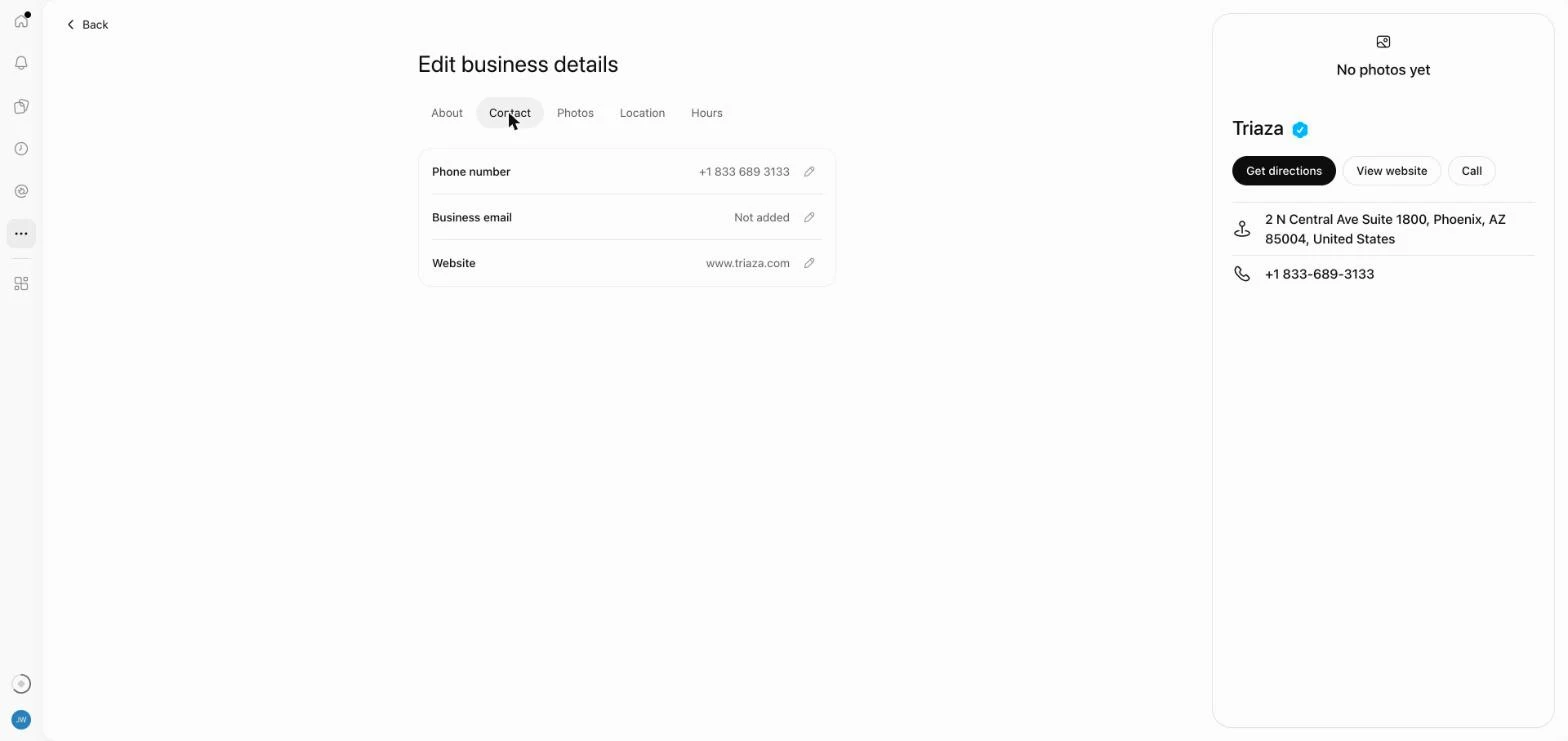
According to OpenAI’s help article, you can update your website, business description, product or service category, logo, delivery policy, and return policy, and add a cover photo and other optional details. Retailers can also connect a product feed with prices and availability.
Three limits apply.
Edits are reviewed. OpenAI reviews and publishes changes, and says updates “can take time to appear in a listing or a ChatGPT answer.”
Your profile isn’t the only source. The same article says “ChatGPT may also use other sources when answering questions about your business,” and the policy page notes that profiles “may also include information from other sources.” A correct profile helps, but it doesn’t override a wrong address sitting on your own website or in a directory.
Verified means identity-checked. OpenAI’s help article says the blue check appears after you pass an identity check run by a company called Persona. (The product page is looser and says the check shows a profile has “been claimed.” Go by the help article.) Either way, the badge is about who manages the profile and says nothing about the quality of the business.
Insights: the part that looks like Search Console
Search Engine Roundtable reported on the tool before launch, after analyst Juozas Kaziukenas spotted it, and described it as Search Console-like. That set expectations high.
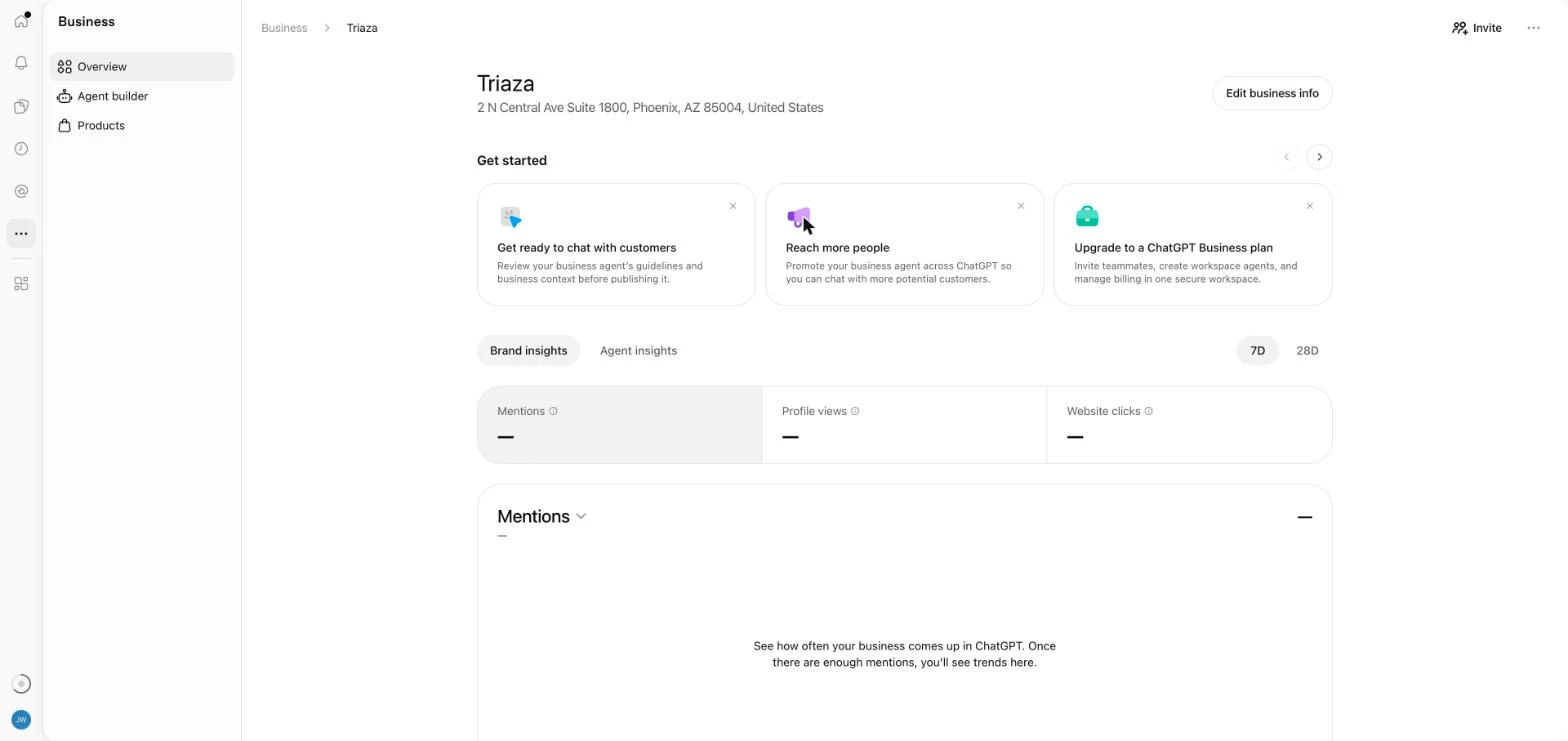
The overview reports four things over the last 7 or 28 days:
| Metric | What it counts | What to keep in mind |
|---|---|---|
| Mentions | For an online business, the times ChatGPT referenced your website. For a local business, the times ChatGPT showed a result for your location. | For online businesses, OpenAI says “the brand name alone doesn’t count.” ChatGPT can name you without it registering. |
| Profile views | Opens of your profile in ChatGPT | Shown in the dashboard. OpenAI’s launch post doesn’t mention it. |
| Website clicks | Clicks on your website link | A recorded click isn’t a confirmed visit or a conversion. Compare against your own analytics. |
| Discovery topics | The top five themes in answers that mentioned or cited you, with each topic’s share | Themes are grouped by OpenAI. They aren’t prompts. |
Under that definition, if someone asks ChatGPT for agency recommendations and it names your company in a sentence without citing your site, the mention count for an online business doesn’t move. The number you see is closer to a citation count than a brand-awareness measure.
What Insights doesn’t show
The boundaries are tighter than Search Console’s, and OpenAI spells most of them out:
- No prompts. The help article says “Businesses don’t receive individual prompts or consumer conversations, including chats with their business agents.”
- No intent data. Discovery topics “don’t reveal individual prompts or directly measure customer intent.”
- No competitors or rankings. The dashboard we see has no share of voice and no view of who else was recommended.
- Nothing under the threshold. Metrics appear only when there’s enough activity, and OpenAI doesn’t publish the cutoff. A blank metric “doesn’t necessarily mean zero activity.”
That last point will frustrate small businesses. Ours is blank, and we can’t tell from the dashboard whether that means two mentions or two hundred.
For a sense of scale at the other end, Search Engine Journal published its own numbers: 353,356 mentions and 2,663 website clicks between October 14 and November 10. That’s under one click per hundred mentions for a large search-industry publisher. One site’s numbers aren’t a benchmark, but they show how wide the gap between being mentioned and being visited can be.
How it compares to what Google and Bing already report
Business Hub is the third first-party report on AI visibility that a site owner can open this year.
| ChatGPT Business Hub | Google Search Console generative AI reports | Bing Webmaster Tools AI Performance | |
|---|---|---|---|
| Available | Beta, November 10, 2026 | Announced June 3, 2026; all sites by August 31, 2026 | Public preview, February 2026 |
| Covers | ChatGPT | AI Overviews, AI Mode, and generative features in Discover | Copilot, Bing’s AI summaries, and some partner integrations |
| Reports | Mentions, profile views, website clicks, discovery topics | Impressions by page, country, and date | Citation counts, cited pages, sampled grounding queries |
| Clicks | Yes | No | No |
| Queries or prompts | No, grouped topics only | No | A sample of grounding queries |
Each tool leaves out something another includes. Business Hub has clicks and no page-level detail, Google has pages and no clicks, and Bing is the only one that shows any of the phrases behind a citation. If you report on AI search for a client or a boss, you now need all three open, and you still can’t see a single real conversation. We covered the wider problem in our post on measuring content performance when the click doesn’t happen.
Business Agents: a chat that speaks for your business
A Business Agent is a separate, labeled conversation inside ChatGPT. When your business appears in an answer, a person can open your profile and, if you’ve published an agent, ask it questions. The agent answers from information you’ve supplied, such as product details and your return policy, following instructions you write.
OpenAI keeps it fenced off from ChatGPT’s own answers. The announcement describes the agent chat as “clearly labeled, separate from the customer’s original ChatGPT conversation, and distinct from ChatGPT’s independent answers.”
Per the help article, an agent can explain products and policies and link to your website. It can’t complete purchases, make bookings, or check an order. OpenAI’s Business Agents Policy also bars instructing an agent to invent prices or reviews, create false urgency, or keep pushing after someone declines.
Agents are open only to eligible ecommerce and online service businesses in the US that have a website and meet the policy’s industry requirements. Triaza is a marketing agency with a verified profile, and this is our Agent builder:
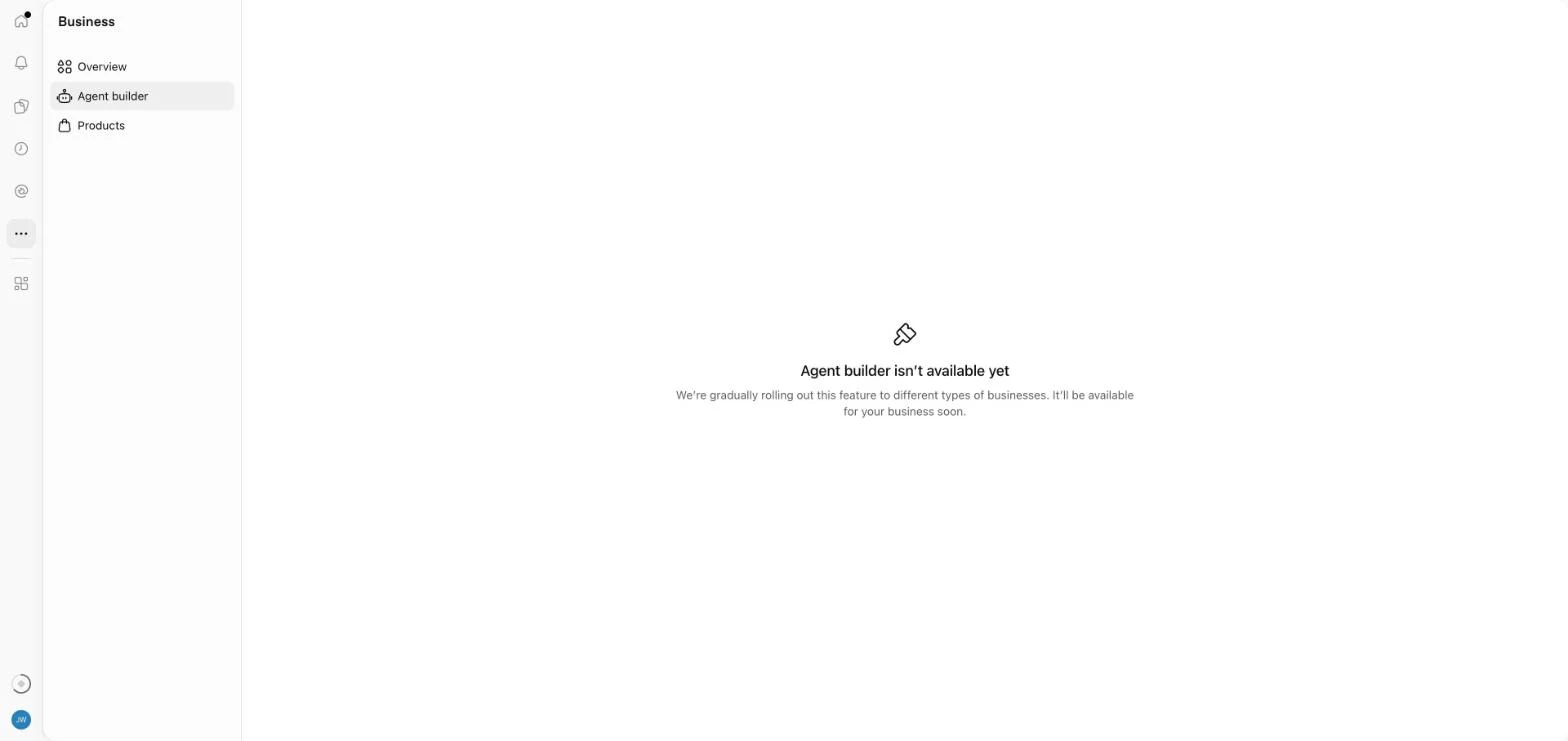
OpenAI also says businesses can “sponsor their Business Agent and use it as the destination for ChatGPT Ads,” and our dashboard already carries a card inviting us to promote an agent we can’t build. Digiday’s reporting frames the free agent as the organic version of an ad format OpenAI was already testing. If you’re weighing the paid side, our breakdown of what a small ChatGPT Ads budget buys still applies.
Who can use it today
Eligibility depends on what kind of business you run and where it is. This table reflects OpenAI’s help article and policy pages as of November 12, 2026, plus our own account where noted. Everywhere it says “insights,” read “after Persona approval, and once activity passes the reporting threshold.”
| Business type | Claim a profile | Insights | Business Agent |
|---|---|---|---|
| US ecommerce store | If eligible, including through Shopify | Yes | If the category is eligible |
| US online service business | If eligible | Yes | If the category is eligible |
| US local store or restaurant | Only an existing listing | Yes | Not yet |
| Other US businesses with a website, such as agencies and B2B firms | If eligible. Ours was. | Yes | Not yet, in our account |
| Businesses outside the US | Eligible businesses, where ChatGPT is available and verification is supported. Local stores and restaurants are US-only for now. | Where claiming is available | Not yet |
| Multi-location brands | Each brand separately. Claiming the main brand doesn’t claim its locations. | No central view across brands or locations | Depends on type |
The table needs two notes. First, OpenAI says “not every business can create or claim a profile,” and that it may hold off on some categories until it has safeguards for them. Second, multi-location management is manual for now: claiming the main brand doesn’t claim its locations, and there’s no central dashboard for a parent company.
What claiming won’t do
OpenAI makes one point in both its help article and its product page: a claimed profile doesn’t guarantee better placement.
From the help article: claiming “doesn’t guarantee increased visibility or give you direct control over ChatGPT’s independent recommendations.” From the product page: “Claiming does not guarantee higher placement or sales.” Benji Shomair, OpenAI’s VP of monetization, told Digiday that a business’s participation “should not have an impact on how frequently it appears.”
So Business Hub won’t replace the work that gets a business cited in the first place. OpenAI says ChatGPT keeps making independent recommendations and may use other sources, which is why your site’s content, your reviews, and your listings elsewhere still matter. Our guide to getting cited in AI search covers that side.
A few other things to know before you start:
- No price is listed, for now. OpenAI’s pages don’t mention a fee. Digiday describes Business Hub as free and reports that OpenAI hasn’t ruled out charging later.
- Published profiles can’t be deleted. OpenAI Support can’t delete, unpublish, or hide a published profile as part of a setup or ownership request. Only unpublished drafts can be deleted.
- Someone may have to show ID. The Persona check may ask for a government-issued ID, business registration information, and proof that you’re authorized to represent the business.
- Hijacking is a fair worry. Barry Schwartz of Search Engine Roundtable wrote that he’s “honestly nervous about people hijacking businesses on here.” OpenAI has a dispute process for profiles claimed by the wrong person, but claiming yours first is the simpler protection.
What it’s useful for right now
These are the places we think the time pays off for a small business or startup.
Fixing what ChatGPT says about you. Our own profile arrived with no hours, no category, no email, and no photos. If yours has a wrong phone number or last year’s address, this is the first place you’ve been able to correct it at the source.
Getting a baseline. Even thin numbers are better than estimates. Once numbers appear, note your 28-day mentions and clicks, and you’ll have something to compare against after your next round of content or PR.
Checking that OpenAI can read your site. The overview includes a Website access card. Ours shows our URL and “Access confirmed.” OpenAI doesn’t document what the card checks, and we read it as OpenAI being able to reach the site. If yours says something else, find out what’s blocking it before you spend time on anything else here.
Using discovery topics to plan content. Once topics appear, they show which themes ChatGPT associates with your business. If the list doesn’t match what you sell, that’s a positioning problem you can work on. If a topic you care about is missing, that tells you where your site needs clearer answers.
Putting your catalog in front of ChatGPT. Retailers can connect a product feed so answers reflect current prices and stock. OpenAI says a feed doesn’t guarantee recommendations, so the reason to connect one is accurate prices and stock.
Checking your analytics against it. Compare the website clicks figure with the chatgpt.com referrals in your own analytics. The two won’t match exactly, since a recorded click isn’t a confirmed visit, but a large gap in either direction needs an explanation.
Debra Aho Williamson of Sonata Insights told Digiday that OpenAI sharing its own data “will take some of the power away from the third-party companies” that sell AI visibility estimates. That seems right as far as it goes. The estimate tools still do things Business Hub doesn’t, such as tracking competitors and covering other AI products. But where the two disagree about your ChatGPT numbers, OpenAI’s count is the first-party one.
Should you claim your profile?
Yes, with modest expectations. OpenAI lists no fee, and the downside of waiting is that your details stay whatever ChatGPT assembled from other sources. For most small businesses the insights will be sparse or blank at first, and agents are off the table unless you sell online in the US.
Treat it the way you’d treat a Google Business Profile in its first month: fill in everything, check it’s accurate, and look at the numbers again in four weeks. The setup guide covers the claim, the two verification stages, and the problems people are running into.
Questions about ChatGPT Business Hub
Is ChatGPT Business Hub free?
At launch, yes. OpenAI’s pages list no price for claiming a profile, viewing insights, or publishing an agent, and you don’t need an Ads account or an Enterprise agreement to claim. Digiday describes Business Hub as free and reports that OpenAI hasn’t ruled out a paid model later.
Is Business Hub the same as ChatGPT Business?
No. ChatGPT Business is a paid workspace plan for teams that use ChatGPT internally. Business Hub is the dashboard for managing how your company appears to the public in ChatGPT. You don’t need the paid plan to claim a profile.
Does claiming my business improve my ChatGPT ranking?
OpenAI says there’s no guarantee. Claiming lets you manage the information you provide. It doesn’t guarantee more visibility, and OpenAI says advertising doesn’t influence ChatGPT’s independent answers either.
Can I see what people ask ChatGPT about my business?
No. You get discovery topics, which are grouped themes from answers that mentioned or cited you. Individual prompts and conversations aren’t shared, including chats with your own Business Agent.
Does Business Hub replace Google Business Profile?
No. They feed different products, and ChatGPT still draws on other sources for business information. Keep your Google Business Profile, your website, and your directory listings accurate and consistent with what you enter in Business Hub.
Why does my dashboard show dashes instead of numbers?
Metrics appear only after activity passes a reporting threshold that OpenAI doesn’t publish. A blank can also mean data is still being collected. It doesn’t necessarily mean zero.
Who can get a Business Agent?
For now, eligible ecommerce and online service businesses in the United States with a website, in categories OpenAI’s Business Agents Policy allows. Local stores, restaurants, and many service firms can hold a verified profile without agent access.